
Human Resource Management
Updated: Mar 28, 2025
Employee Management includes employee data records and salary settings. Click on the Employee in the Basic module to enter the management screen.

1. Create New Employee
Add new employee by button above.

The userID, name and loginID must be filled in when adding an employee, which is the same as adding a new user.

After adding, the user information will be opened on the new screen.


2. Employee Edit
Click on the EmployeeID on the employee search screen

After clicking on EmployeeID, you can edit the employee information

2.1. Basic Information
Record basic informations of employee.

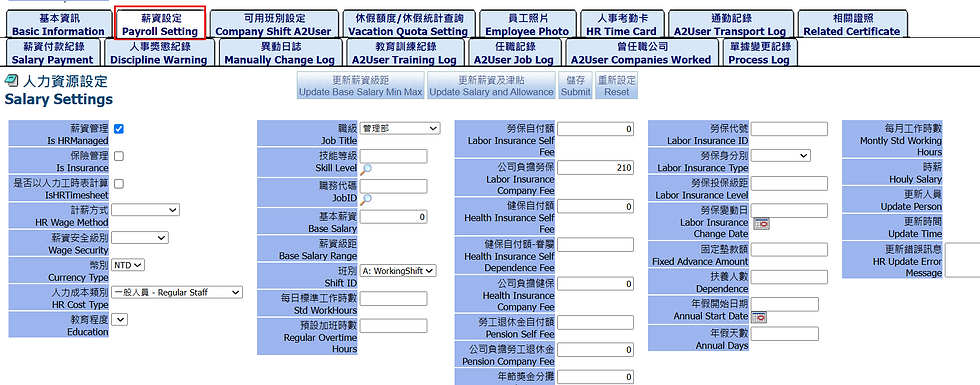
2.2. Payroll Setting
his tab allows you to set employee salaries and related allowances

2.3. Company Shift A2User
Employee can set different shift.
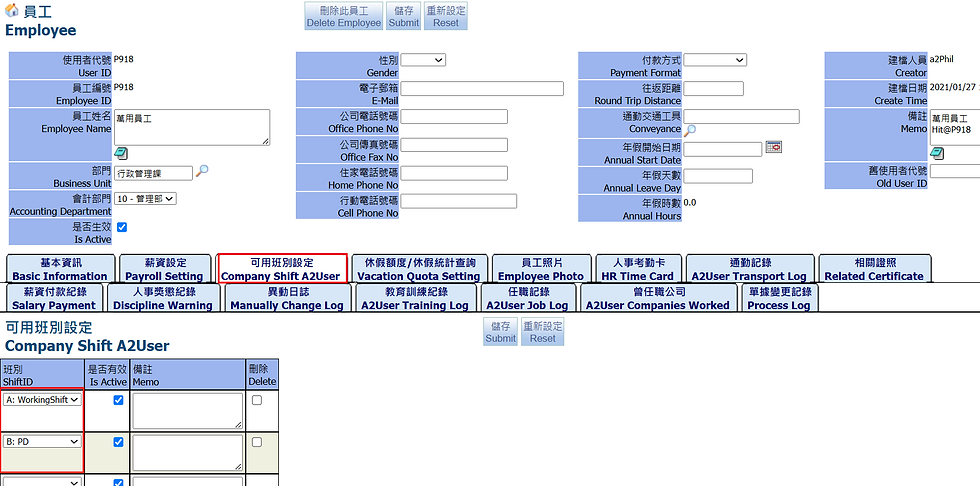
In the user scheduling screen, you can see that these available shifts have been set.

This setting is the same as other settings of User-Company Shift A2User, Please refer to section: User Management- 2.8. Company Shift A2User
2.4. Vacation Quota Setting
This tab allows you to set employee leave quotas and query vacation summery. You can use button "Load setting" to bring the default value based on the leave summary table.


2.5. Employee Photo
Employee photos can be uploaded and previewed on this screen

2.6. HR Time Card
This screen allows you to view employee working hours, overtime hours, etc.

點擊”工時表單號”查看
Click “Message ID” to check


2.7. A2User Transport Log
This screen displays the distance and travel times, making it easier to calculate carbon emissions.

2.8. Related Certificate
You can record relevant certificate courses

2.9. Salary Payment
This tab allows you to view salary payment records of employee

2.10. Discipline Warning
This tab is to view commendation and warning records (Employee Discipline) of employee,
click “New Discipline Warning”and relevant disciplinary warning notes can be created


2.11. Manually Change Log

2.12. A2User Training Log
You can record relevant training courses

2.13. A2User Job Log
You can record previous positions held

2.14. A2User Companies Worked
The name of the company where you previously worked can be recorded

2.15. Process Log
Here you can check employee information change records

3. Employee Management
3.1. Search Users
User records can be viewed at this tab

3.2. Employee Record
Employee Record
Employee records can be viewed at this tab
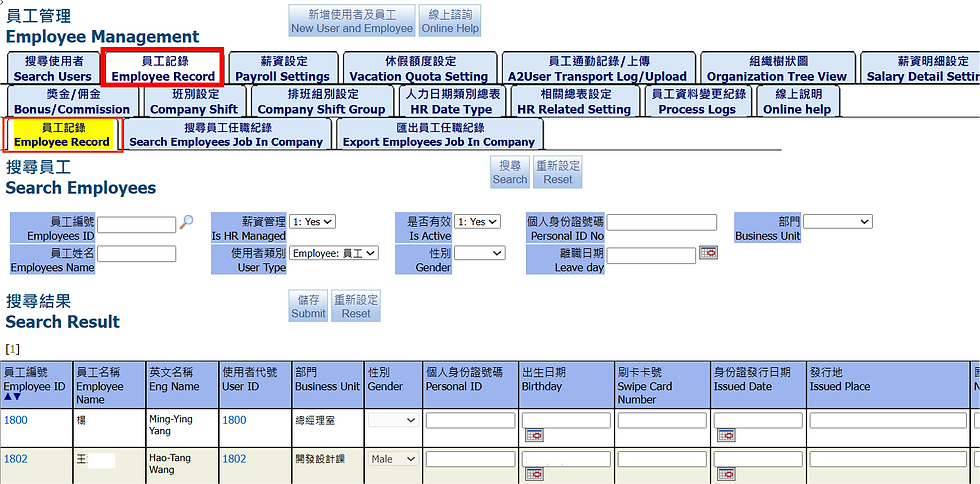
Search Employees Job In Company
You can search the records of employees in relevant job of the company , such as basic salary, years in current role, etc.

Export Employees Job In Company
Employee job in company can be exported into Excel reports, click “Export to Excel”

3.3. Payroll Settings
Salary Settings
This tab is to set the salary of employee

Salary Setting Supervisor
This tab is to set the salary of supervisor

3.4. Vacation Quota Setting
This tab is to search or edit the leave quota of employees. For the initial setting, you can use "Reload setting" by Take Leave Subtype to load employees whose data has not been loaded at once and the existing data will be retained.


You need to set up HRLeavingType before you reload.


3.5. A2User Transport Log/Upload
Carbon emissions can be calculated based on employee commuting records
Draft A2User Transport Log
You can view the commuting record of all employees, the status is in Draft.
Relevant attachments can be uploaded

Active A2User Transport Log
You can view the commuting record of all employees, the status is in Active

3.6. Organization Tree View
This screen allows you to view the organization in the form of a tree diagram.

The organization can be edited below. The organization chart consists of upper and lower level settings.

3.7. Salary Detail Settings
Salary Detail Settings
You can view employees's salary details, such as allowances or bonuses

Salary Detail Settings Supervisor
You can view supervisor’s salary details, such as allowances or bonuses


3.8. Allowance Settings
Allowance Settings
You can search employee allowances

Allowance Settings Supervisor
You can search supervisor allowances

3.9. Bonus/Commission
You can search relevant bonuses and commission
Active Bonus
This screen show relate Bonus with status in Active

Draft Bonus
This screen show relate Bonus with status in Draft

Click Bonus ID HTMSG210906002 , you can check bonus detail and add new members

Search Bonus
This screen show Bonus in all status

Order To Bonus
You can add Bonus from the Order, pick Order ID and click "Create Bonus".

Bonus Rank
You can search monthly bonus rankings

Bonus Report Quarterly
You can search bonus report quarterly

Bonus Report Yearly
You can search bonus report yearly

My Approval
Go to My Approval to approve Bonus documents in batches

3.10. Company Shift
You can add new employee shifts at this tab. Must set ShiftID for employeess to operate the on and off work functions in vacation management and production management.

Click “Calculate Work Hours”, It will be automatically calculated “Regular Time Hours” and “Night Time Hours”

3.11. Company Shift Group
You can set company shift group


3.12. HR Date Type
You can set the salary calculation method for different working days, such as holiday work, Regular Time Rate is 2 times salary

3.13. HR Related Setting
In this screen, you can set the summary table settings related to human resources, such as the HRLeavingType and HR Allowance etc.


3.14. Process Logs
In this screen, you can view the change record of this document, which will record the change person, change time and change field.

3.15. Online help
On this screen, you can view online documents or help content. If you need to upload files, you need to enter the setting page of the approval process.

End.
